Modules
Modules จัดกลุ่มโค้ดและควบคุม privacy เป็นพื้นฐานของการจัดโครงสร้างโปรเจกต์ใน Rust
Module Tree
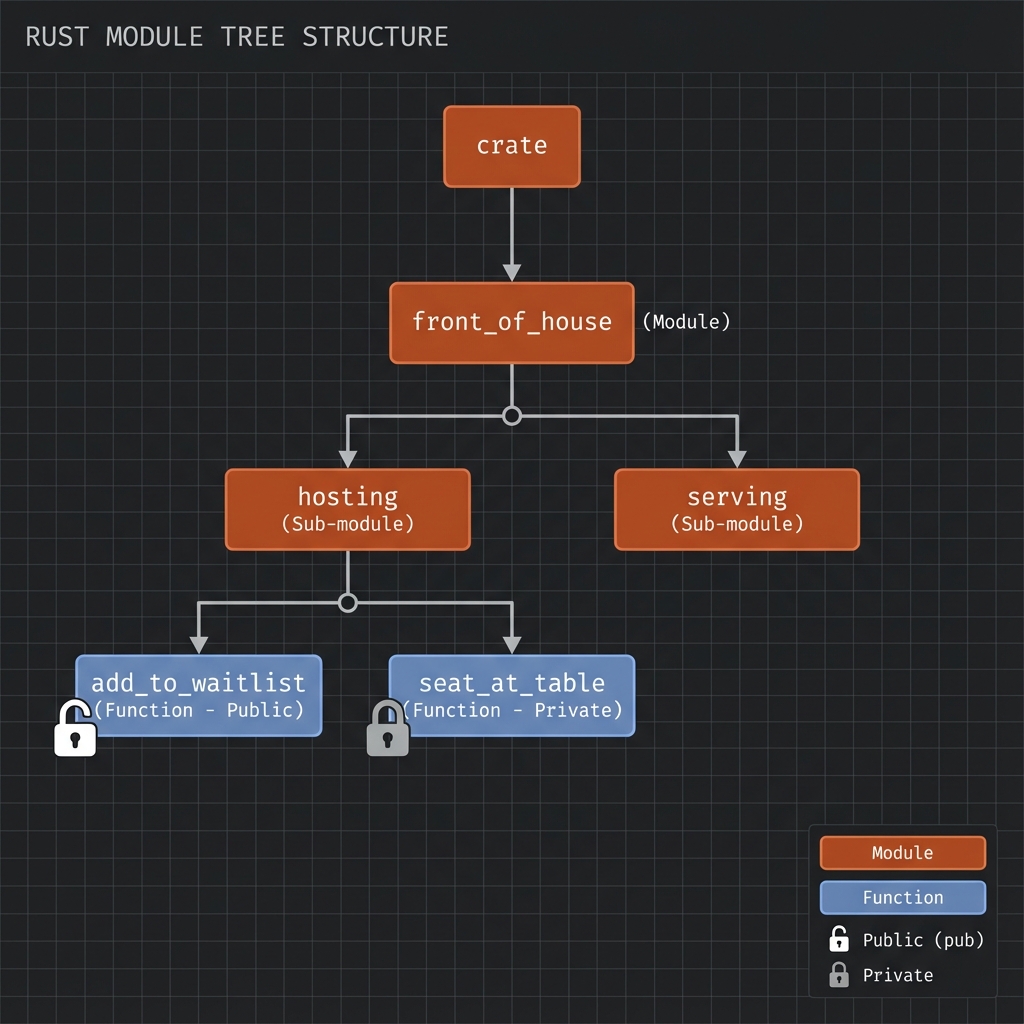
โปรเจกต์ Rust มีโครงสร้างเป็น tree:
นิยาม Module
mod front_of_house {
    pub mod hosting {
        pub fn add_to_waitlist() {}
        fn seat_at_table() {} // private
    }

    mod serving {
        fn take_order() {}
        fn serve_order() {}
    }
}

fn main() {
    // เรียกใช้ public function
    front_of_house::hosting::add_to_waitlist();
}
pub Keyword
Default: ทุกอย่างเป็น private
mod my_module {
    pub fn public_function() {}  // ✅ เข้าถึงได้จากนอก
    fn private_function() {}     // ❌ private

    pub struct PublicStruct {
        pub name: String,        // ✅ field public
        age: u32,                // ❌ field private
    }

    pub enum PublicEnum {
        Variant1,  // ✅ variants ของ pub enum เป็น public
        Variant2,
    }
}
Visibility Modifiers
| Modifier | Visibility |
|---|---|
| (default) | Private ใน module เดียว |
pub | Public ทุกที่ |
pub(crate) | Public ใน crate เดียว |
pub(super) | Public ใน parent module |
pub(in path) | Public ใน path ที่ระบุ |
mod outer {
    pub(crate) fn crate_only() {}

    pub mod inner {
        pub(super) fn parent_only() {}

        pub(in crate::outer) fn outer_only() {}
    }
}

fn main() {
    outer::crate_only();      // ✅ OK - same crate
    // outer::inner::parent_only(); // ❌ Error - only visible to outer
}
ใช้ use
Basic use
mod front_of_house {
    pub mod hosting {
        pub fn add_to_waitlist() {}
    }
}

use front_of_house::hosting;

fn main() {
    hosting::add_to_waitlist();
}
Idiomatic use
// ✅ Good: use parent module สำหรับ functions
use std::collections::HashMap;

fn main() {
    let mut map = HashMap::new();
    map.insert("key", "value");
}

// ✅ Good: use full path สำหรับ structs/enums
use std::collections::HashMap;
use std::io::Result;
use กับ as (alias)
use std::fmt::Result;
use std::io::Result as IoResult;

fn function1() -> Result {
    Ok(())
}

fn function2() -> IoResult<()> {
    Ok(())
}
Re-exporting with pub use
mod front_of_house {
    pub mod hosting {
        pub fn add_to_waitlist() {}
    }
}

// Re-export ให้ผู้ใช้ library เข้าถึงได้ง่าย
pub use crate::front_of_house::hosting;

// ผู้ใช้ library เรียกได้แค่:
// use my_crate::hosting;
// hosting::add_to_waitlist();
Nested Paths
// แทนที่จะเขียน:
use std::cmp::Ordering;
use std::io;

// เขียนแบบนี้:
use std::{cmp::Ordering, io};

// หรือ:
use std::io::{self, Write};
// = use std::io และ use std::io::Write
Glob Operator
// นำเข้าทุกอย่างที่เป็น public
use std::collections::*;

fn main() {
    let mut map = HashMap::new();
    let mut set = HashSet::new();
}
คำเตือน: ใช้
*ระวัง เพราะไม่ชัดเจนว่า names มาจากไหน
ตัวอย่างจริง: Library Structure
// lib.rs
mod authentication;
mod database;
mod handlers;

pub use authentication::User;
pub use database::Connection;

pub mod api {
    pub use crate::handlers::*;
}
ผู้ใช้ library:
use my_lib::User;
use my_lib::Connection;
use my_lib::api::get_users;
Privacy Rules
- Parent can’t see private children
- Children can see private ancestors
- Siblings can see each other
mod parent {
    fn parent_private() {}
    pub fn parent_public() {}

    mod child {
        fn child_func() {
            super::parent_private(); // ✅ Child can access parent's private
            super::parent_public();  // ✅
        }
    }

    mod sibling {
        fn call_child() {
            // super::child::child_func(); // ❌ Can't access sibling's private
        }
    }
}
ลองทำดู! 🎯
- สร้าง module tree 3 ระดับ
- ใช้
pub(crate)และpub(super) - Re-export ด้วย
pub use
สรุป
| แนวคิด | Syntax |
|---|---|
| Define module | mod name { } |
| Public | pub fn, pub struct |
| Crate-only | pub(crate) fn |
| Parent-only | pub(super) fn |
| Use | use path::to::item; |
| Alias | use path as name; |
| Re-export | pub use path; |
| Nested | use std::{io, fmt}; |
| Glob | use module::*; |
👉 ต่อไป: Paths